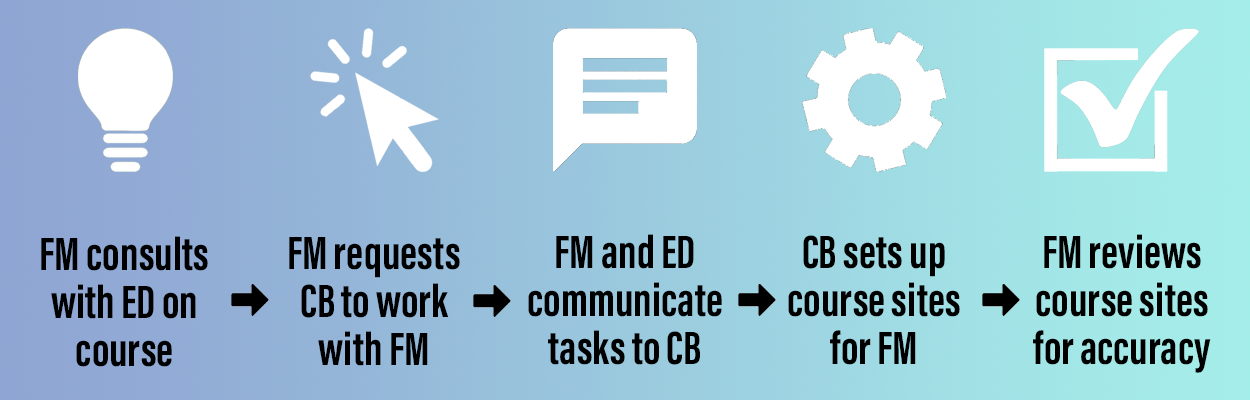
Course builders are able assist you with course setups that use Dalhousie-supported instructional technologies and, once the course setup is complete, orient you to your course space. Typical course building work includes:
- Creating Brightspace course sites
- Linking to Panopto audio or video files so students can listen or watch
- Configuring synchronous meeting spaces in Collaborate Ultra or Microsoft Teams
- Adding links to Campus Pack tools (e.g., wikis, blog, etc.
- Setting up Urkund so you and/or your students can check the originality of their written work
Setting up Brightspace course sites could include a number of tasks, such as:
- Copying Brightspace site contents from previous terms
- Setting up a course homepage (e.g., customizing course banner, posting announcements, adding widgets, etc.)
- Uploading content, creating modules, setting release dates, adding links, embedding videos, adding readings, etc.
- Inputting quiz questions
- Recreating your pre-existing rubrics in digital form
- Creating assignment dropboxes
- Setting up the gradebook and linking to other Brightspace functions (e.g., Quizzes, Discussions, Assignments, etc.)
- Configuring discussions, including setting up forums and topics, restricting their access by student groups, attaching grade items, etc.
- Setting up student groups
Please note Course Builders are not able to:
- Assist with non-Dalhousie-supported instructional technologies
- Develop or curate content
- Create assessments, write quiz questions, or develop rubrics
- Be on-call throughout the term
An infographic summarizes the course building process and scope, including what happens after you’ve been assigned a Course Builder, and how they are able to assist you with your course. If you have any questions about whether a certain task is within a Course Builder’s scope, please talk to them or reach out to the CLT eLearning team at elearning@dal.ca.